
Office files
Word, Excel, PowerPoint
Product
A desktop batch workflow for real Office deliverables.
MotorTranslator translates Word, Excel, and PowerPoint batches into finished deliverables while preserving formatting, visibility, and provider control.
Before downloading: MotorTranslator is a Windows desktop application, not an instant file utility. Use Microsoft Word for the best Word-document results, or LibreOffice as an alternative, and bring your own OpenAI or Mistral AI API key for translations.
Input
Document batches
One run, consistent settings
MotorTranslator
Interactive desktop workflow
Output
Translated deliverables
Files remain files
Visible provider usage
OpenAI or Mistral AI BYOK
Why MotorTranslator exists
AI translation is easy. Delivering real Office files is the hard part.
We created MotorTranslator because professional translation work is not just about getting translated text. It is about keeping documents usable, handling volume, controlling costs, and delivering files that can move straight into review or production.
The core idea
Translate documents as documents.
Copy-pasting into chat boxes is fine for quick text. It breaks down when you need Word reports, Excel workbooks, PowerPoint decks, repeatable settings, and deliverables that preserve structure.
Reduce formatting rework
MotorTranslator focuses on preserving layout, tables, spacing, and document structure, especially with Microsoft Word.
Move from one file to batches
Prepare several Office files, reuse the same settings, and let the desktop workflow process the repetitive work.
Keep the process visible
Files, settings, progress, and outputs remain understandable while translations run on the desktop.
Bring your own AI provider
Use your own OpenAI or Mistral AI key, with provider choice, usage, cost, and data routing under your control.
Avoid SaaS-style file quotas
Use a perpetual desktop license instead of a monthly SaaS plan built around opaque quotas or file limits.
Use the setup that fits
Microsoft Word gives the best Word-format preservation; LibreOffice remains available as a free best-effort alternative.
A lower-cost alternative to SaaS
Your total cost is far lower than SaaS translation services.
There are only two transparent costs: a one-time MotorTranslator license and AI usage paid directly to OpenAI or Mistral AI at provider rates, rather than through a marked-up SaaS subscription - keeping recurring translation costs far lower.
One-time MotorTranslator license
A perpetual desktop license, paid once instead of a recurring SaaS subscription.
See license pricing.Direct OpenAI or Mistral AI usage
Pay provider usage directly, at provider rates. Set a low budget and monitor it.
Examples of AI provider usage only
French
English
In Search of Lost Time
About 4,200 pages / 1.27M words
Estimated provider usage only: about $1-$2
English
German
A Tale of Two Cities
About 400 pages / 135K words
Estimated provider usage only: about $0.10-$0.20MotorTranslator is built to save the expensive part: your time preserving, reviewing, and delivering real Office documents.
How provider keys and spending caps work.
These are provider usage estimates only. They do not include the MotorTranslator license. Actual provider cost depends on tokenization, selected provider, selected profile, document content, retries, overhead, and current provider pricing. Sources: OpenAI GPT-4o mini pricing, OpenAI GPT-4.1 pricing, Mistral AI pricing.
Proof of rendering quality
Real document. Real translation. Preserved layout.
This sample starts from a public Calibre DOCX demo file, translated from English to French with MotorTranslator, then exported to PDF. The goal is simple: show how much of the original structure, spacing, images, and document feel is preserved.
Office layout preserved
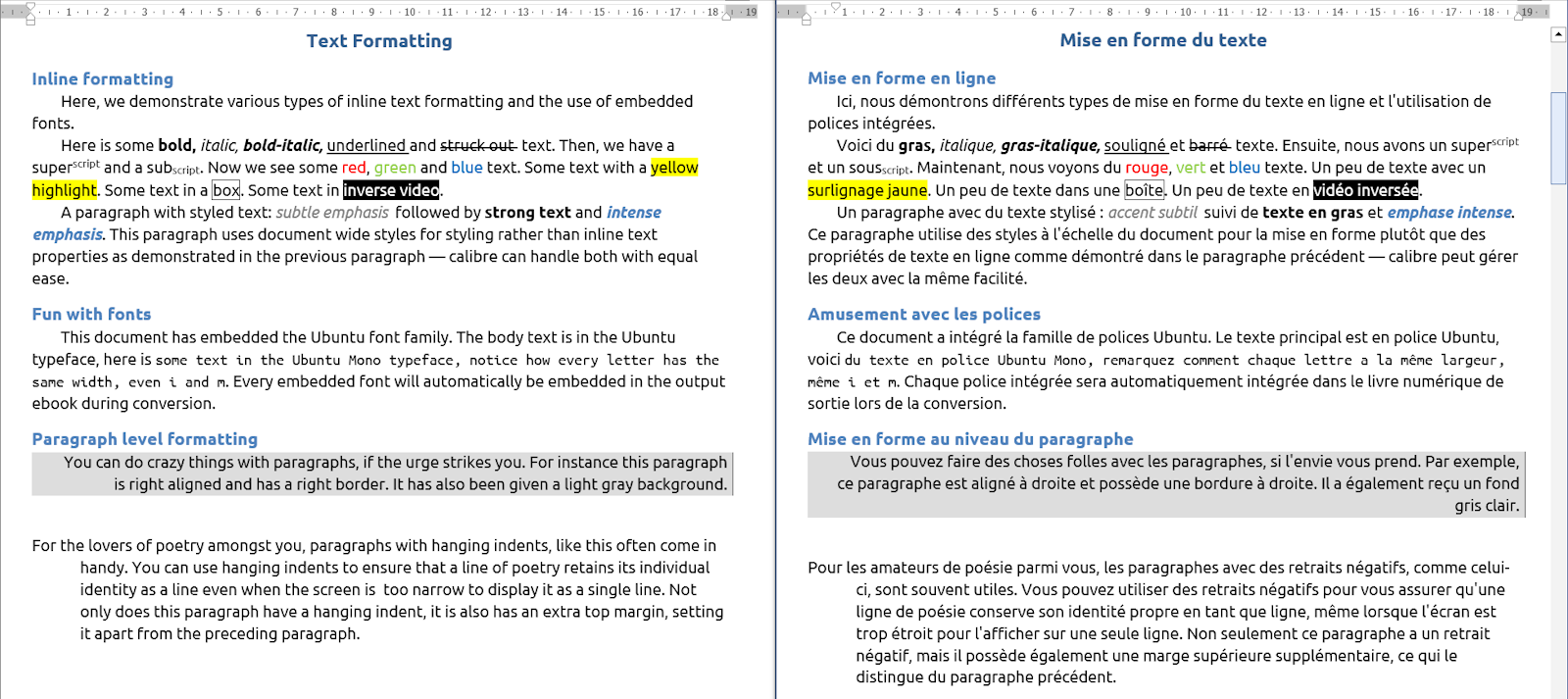
A practical proof of format preservation
Download the files and compare the result yourself. The translated file remains a real Office document, not a text dump.
Less cleanup after translation
The business value is simple: spend less time rebuilding documents and more time reviewing translated content.
Supported languages in v1.0
Major business languages, plus a strong European base.
MotorTranslator v1.0 supports 32 source and target languages for Office document translation, including new world-market languages and a broader European base.
World-market additions
Arabic
Chinese
Hindi
Japanese
Russian
v1.0 language pack
Albanian
Czech
Danish
Dutch
English
Estonian
Finnish
French
German
Greek
Hungarian
Irish
Italian
Latvian
Lithuanian
Maltese
Norwegian
Polish
Portuguese
Romanian
Serbian
Slovak
Slovenian
Spanish
Swedish
Turkish
Ukrainian
Interactive comfort. Batch productivity.
MotorTranslator is designed for the everyday reality of translation work: sometimes you need control, sometimes you need volume, and often you need both.
Interactive desktop workflow
Keep files, settings, progress, and output visible while translations run.
Batch queue
Translate multiple Word, Excel, and PowerPoint files with consistent settings.
Best with Microsoft Word
Use Microsoft Word for the best Word-format preservation in professional documents.
LibreOffice alternative
LibreOffice is supported as a free alternative with best-effort formatting results.
Test it with your own documents.
Start with a 14-day trial, then buy a perpetual license when MotorTranslator fits your workflow.