
Windows
MotorTranslator is designed for Windows desktop use.
Install the desktop application, activate your trial or purchased license key, and translate Office documents with your own AI provider key.
Important: read the Windows security note before installingMotorTranslator is a desktop workflow for Office documents. Make sure your setup is ready.
MotorTranslator is designed for Windows desktop use.
Use Microsoft Word for best results, or LibreOffice as a free alternative.
Translations require access to the selected AI provider.
Use your own OpenAI or Mistral AI key.
Account and API key creation is free. Provider usage remains under your control.
How to get an API key.
Windows may show a security prompt the first time you install MotorTranslator.
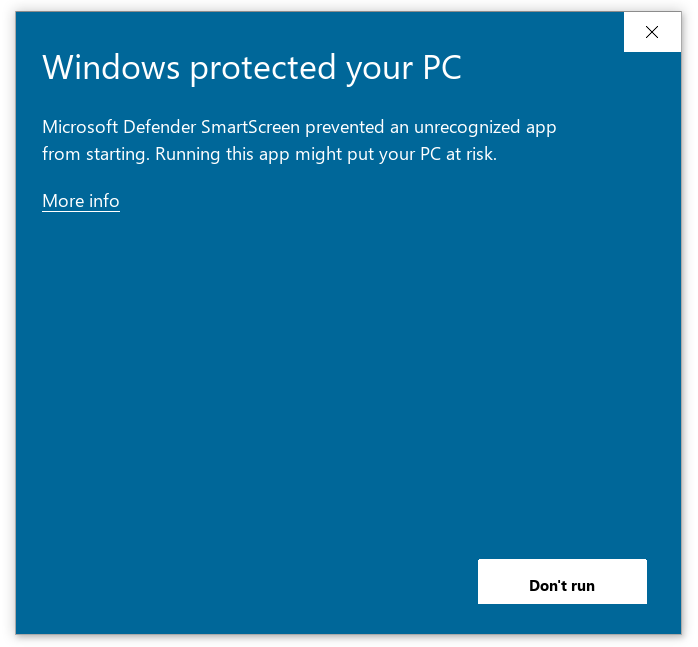
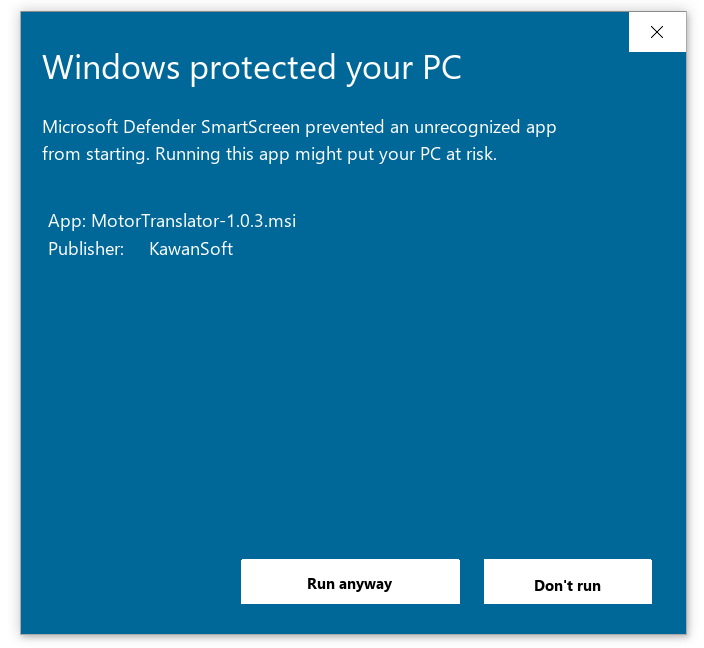
MotorTranslator is signed by KawanSoft using Microsoft Azure Artifact Signing. Even with a valid signature and certificate, Microsoft Defender SmartScreen may still show a blue "Windows protected your PC" warning when an installer is new or not yet widely downloaded. This is a reputation warning, not a sign that the installer is unsigned.
Click "More info", check that the publisher is "KawanSoft", then click "Run anyway".
Do not continue if Windows shows an unknown publisher or a publisher other than KawanSoft.
Your antivirus may also examine the installer the first time you download or launch it. The first
translation can trigger another short scan because MotorTranslator uses the embedded
WordBridge.exe helper for Office document processing.
You can activate MotorTranslator with either a 14-day trial license or a purchased perpetual license.